Streaming music conversion myths circulate widely among casual listeners, particularly around audio quality, metadata, and whether saving a track for personal offline use is even legal. Many of these claims get repeated in forums without anyone checking what a specific converter actually does. This article compares those assumptions against published product details from Sidify Inc, rather than relying on secondhand claims passed along in comment sections.
Myth: Converting Streaming Music Always Degrades Audio Quality
A frequent assumption holds that any conversion process automatically thins out the original recording. That is not accurate across the board. Sidify Inc describes a bit-perfect approach for Apple Music conversions that keeps full audio detail intact, rather than recompressing tracks into something weaker.
For its Spotify-focused converter, output can reach 320kbps MP3 or 24-bit, 44.1 kHz lossless FLAC, depending on the format chosen. Amazon Music conversions follow a similar pattern, with HD and Ultra HD tracks retaining their original detail, and Dolby Atmos and Spatial Audio are also supported. This challenges one of the more persistent streaming music conversion myths, since actual output quality depends heavily on which tool and format get selected.
Myth: All Streaming Music Converters Produce Identical Output
Another widespread belief treats every converter as functionally the same, producing identical files regardless of brand. In practice, platform coverage and format options vary considerably. The lineup covers support for over 17 platforms, including Spotify, Apple Music, Amazon Music, Tidal, Deezer, SoundCloud, Qobuz, and YouTube Music, split into separate dedicated converters for each service, such as the Apple Music Converter, Amazon Music Converter, Tidal Music Converter, YouTube Music Converter, Deezer Music Converter, and SoundCloud Music Converter.
Output formats differ by product too. Depending on the specific converter chosen, formats can include MP3, AAC, WAV, FLAC, AIFF, or ALAC, and for Amazon Music specifically, also EAC3 or AC4. A converter built for fewer formats simply will not serve every playback device equally, which is exactly what makes the idea of fully interchangeable tools misleading.
Sidify’s App Mode vs. Webplayer Mode: Understanding the Technical Differences
Part of the confusion behind myths comes from mixing up two different delivery approaches in the category, namely software installed as a desktop application versus a tool that runs inside a browser window. The confirmed catalog from Sidify Inc is built around downloadable desktop applications rather than browser-based tools. Its Spotify-focused product is offered as a free download for Windows and macOS, with a separate APK package listed for Android devices running version 8 or above.
That desktop delivery model matters because it determines where files land and how they get managed afterward. A locally installed application handles songs, albums, playlists, podcasts, radios, and audiobooks, converting them for permanent storage on a computer rather than for temporary streaming access. Recognizing that distinction helps separate what a given tool is actually built to do from assumptions about how streaming conversion software works in general.
Myth: You Cannot Preserve Metadata When Converting Music
A persistent myth claims that converting streaming tracks wipes out metadata, leaving files without an artist name, album title, or cover art. Product pages from Sidify Inc state otherwise. For Apple Music conversions, the brand describes preserving full metadata, including artist, album, genre, and cover art, alongside Hi-Res Lossless output.
The same holds for Amazon Music. Retained ID3 tags include song title, artist, and album artwork, which keeps a music library organized instead of leaving behind unlabeled files. This directly contradicts one of the more common streaming music conversion myths circulating among casual listeners.
- Some assume a converted file automatically loses its original cover art, when metadata retention is a stated feature across several products in the lineup.
- Others believe conversion always re-encodes audio at a lower bitrate, even though original quality preservation is described for both Apple Music and Amazon Music conversions.
- A frequent false belief is that converted tracks cannot be organized by album or artist afterward, despite ID3 tag support addressing exactly that.
- Many think offline playback after conversion only works on one device type, though formats like MP3, AAC, and FLAC exist specifically for cross-device use.
- There is also a myth that a free conversion tool cannot handle playlists, while Sidify Music Converter Free is described as converting Spotify songs and playlists into common formats.
Myth: Streaming Music Conversion Violates Copyright Automatically
Legality is probably the murkiest of all streaming music conversion myths, and online opinions tend to sound more confident than nuanced. Product pages note that these tools are designed for personal, fair-use downloading. That phrasing signals an intended scope limited to private, individual use rather than redistribution.
This does not mean every possible use of a converter is automatically lawful everywhere, since rules can depend on jurisdiction and specific circumstances. What it does mean is that blanket claims painting all music format conversion as inherently illegal oversimplify a more nuanced legal landscape. Personal offline listening and commercial redistribution are not the same activity, and treating them as identical is part of what keeps this particular myth alive.
Myth: Dedicated Streaming Converters Only Produce Basic MP3 Files
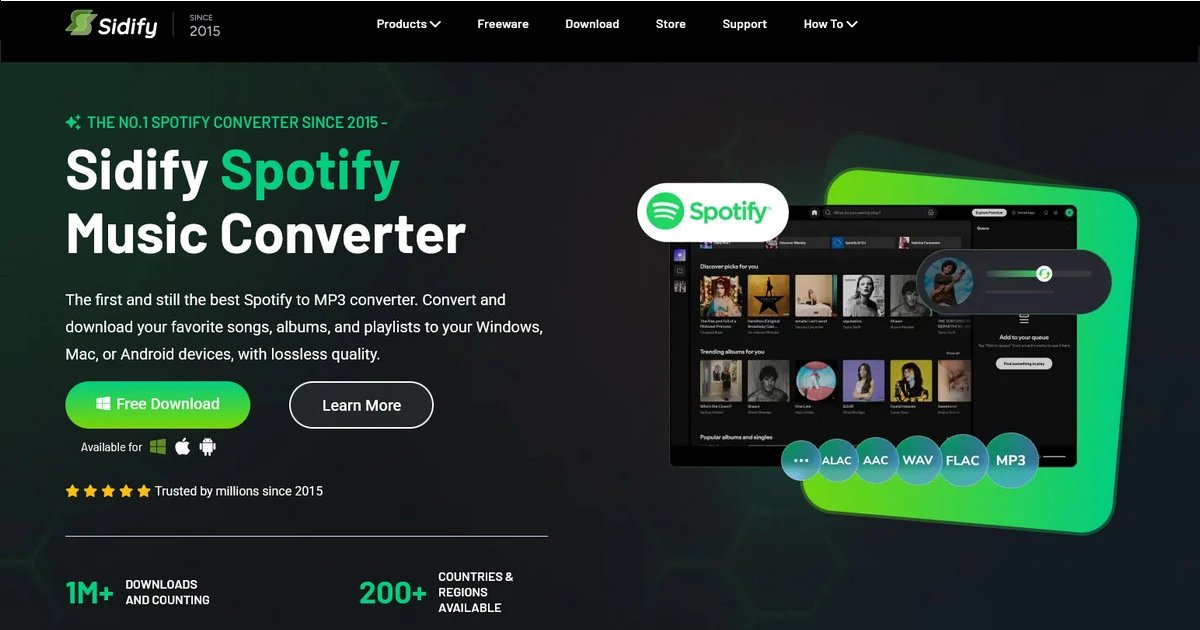
A narrower but still common belief treats every converter in this category as a one-format tool limited to plain MP3 output. That is not the case for the catalog offered by Sidify Inc. Depending on the platform, output options stretch across MP3, AAC, WAV, FLAC, AIFF, ALAC, and, for Amazon Music specifically, EAC3 or AC4 as well.
Format breadth matters because different playback devices and storage goals call for different containers. A lossless FLAC file serves a different purpose than a compact MP3, and having both available under one product line addresses more than one listening scenario. Assuming a single converter can only ever hand over one generic file type is simply not supported by what the product pages describe.
Streaming music conversion myths tend to persist because few people check primary product pages before repeating a claim. Stated features on audio quality, metadata, format variety, and legal scope tell a more precise story than forum chatter ever does.